
The latest Diatronik BimmerX BMW software version, released on September 5, 2026, adds a new DME FSC Calculation function. The feature is free for all BimmerX users and does not require a dongle or an additional paid license. This guide explains how to update BimmerX and use the new DME FSC function.
What Is BimmerX?
BimmerX is a BMW master engineering and diagnostic software developed by Diatronik. It is designed for professional locksmiths, automotive technicians, and repair workshops. The software combines BMW diagnostics, coding, module programming, engineering functions, and bench operations in one system.

With the latest update, BimmerX now supports DME FSC Calculation.
DME FSC Calculation: Key Information
• New function: DME FSC Calculation
• Cost: Free
• Access: Available to all BimmerX users
• BMW authorization: This function is not authorized by BMW
The DME FSC function is not included in the paid-function section. Therefore, BimmerX users can access it without purchasing an additional function or license.
DME FSC Calculation in BimmerX
The new DME FSC Calculation option is available directly in the updated BimmerX software.
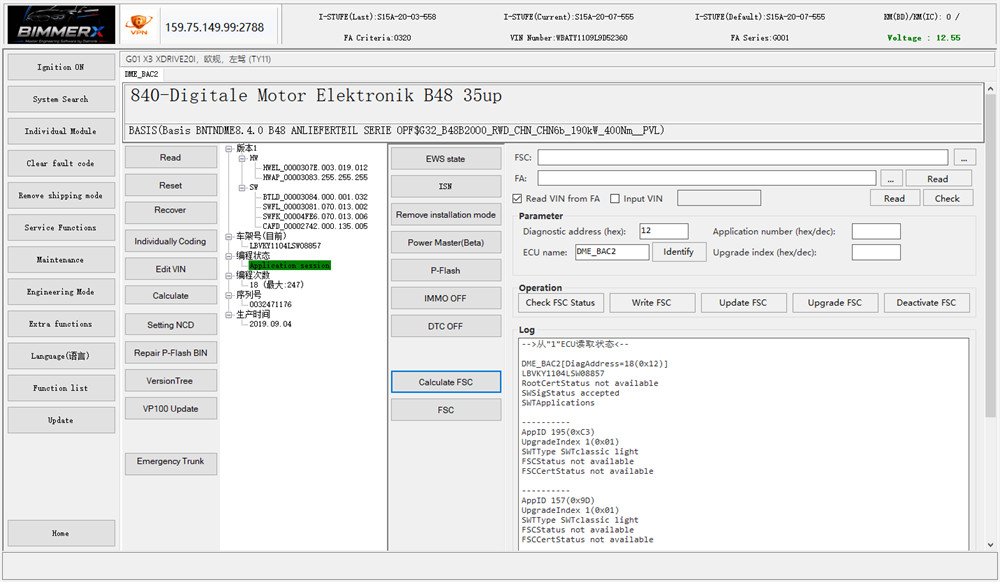
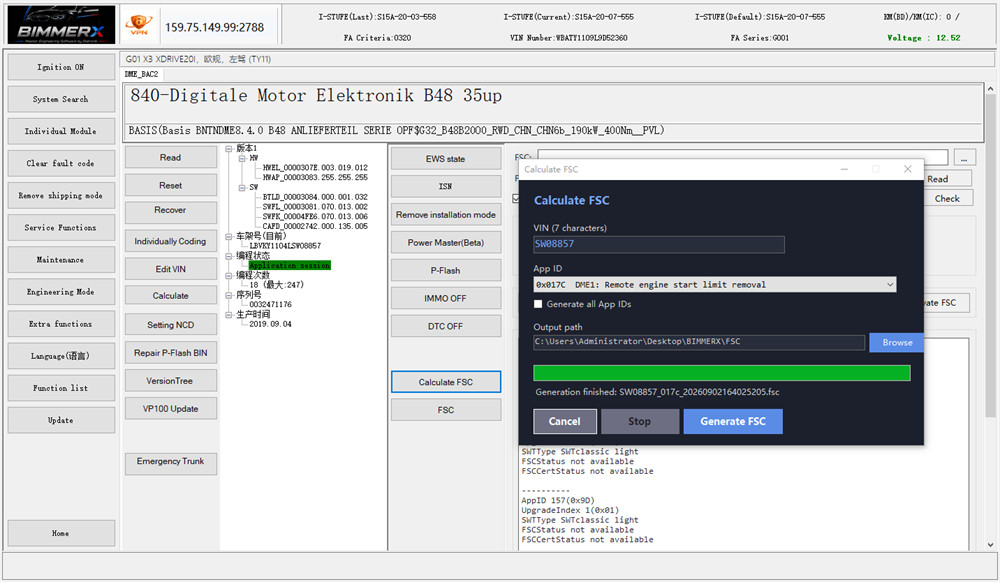
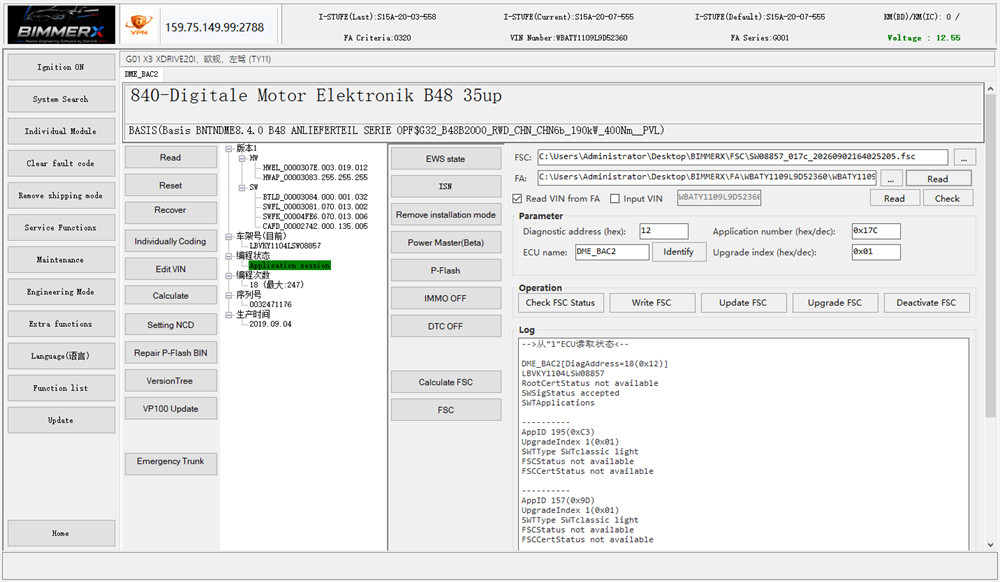
How to Update DME FSC Calculation in BimmerX Software
Follow these steps to install the latest software version and access the DME FSC Calculation function.
Step 1: Start BimmerX
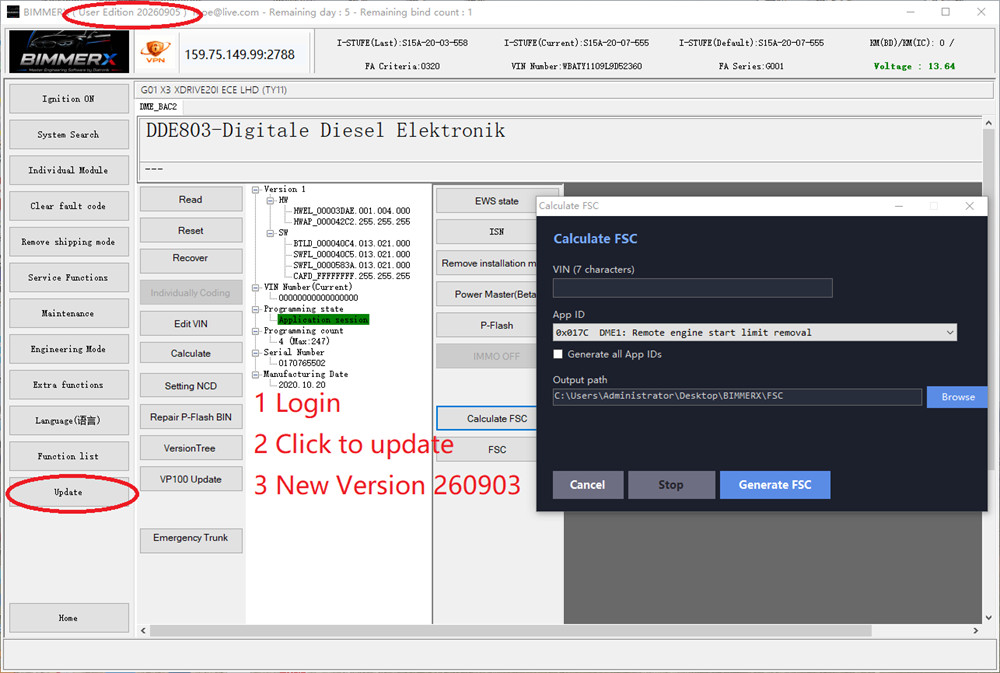
Open the BimmerX software and log in with an available username and password.
If you do not have an account, contact your dealer to get a free login account. A dongle is not required.
Step 2: Update the Software
After logging in, click “Update” and install the latest software version.
The latest version is:
20260905
Step 3: Open DME FSC Calculation
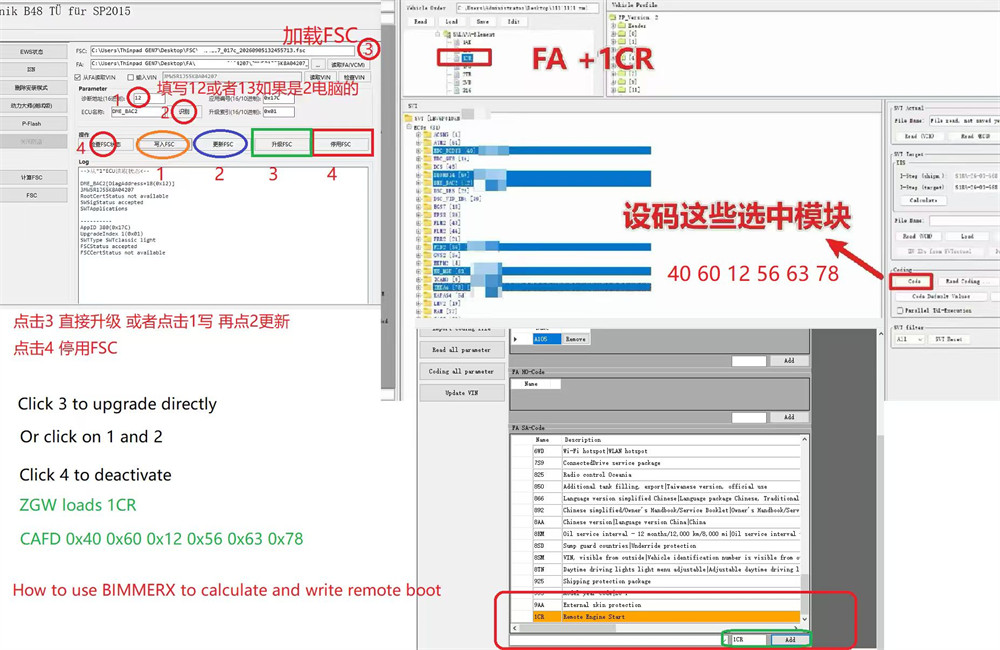
After the update is completed, click “Calculate FSC” to enter the DME FSC Calculation function.
Step 4: Choose an FSC Update Method
BimmerX provides two ways to update the FSC.
- Way 1: Upgrade FSC
Click “Upgrade FSC” to update the FSC directly.
- Way 2: Write and Update FSC
Click “Write FSC”, then select “Update FSC” to complete the update.
If you do not want to use FSC, select “Deactivate FSC”.
How to use BIMMERX to calculate and write remote boot?
Please pay attention to the following configuration information:
•ZGW loads 1CR
•CAFD: 0x40 0x60 0x12 0x56 0x63 0x78
Other BimmerX BMW Functions
DME FSC Calculation is only one of the functions available in BimmerX. The software also supports BMW BDC1, BDC2, and BDC3 operations, module replacement, unlocking, ISN-related functions, engineering modes, and other BMW diagnostic and programming tasks.
Main Features of Diatronik BimmerX
1. Dedicated Server Infrastructure
BimmerX uses dedicated USA-based servers for online calculations and remote server operations.
2. Accurate Data Processing
The software has been re-engineered from previous platforms to improve data reading and processing accuracy.
3. Built-in VPN
An integrated VPN mode is available for remote server connections.
4. Bench Setup Support
BimmerX supports bench-mode operations without requiring all physical vehicle components to be installed.
5. Engineering and Coding Functions
The software supports advanced vehicle adaptations, module programming, coding, and diagnostic data operations.
Diatronik BimmerX Software Functions
BimmerX supports a wide range of BMW engineering and diagnostic functions, including:
1.BDC1, BDC2, and BDC3 new part replacement
2.BDC1 and BDC2 unlocking
3.BDC2 + key to obtain full ISN + EWS6
4.EGS5, EGS6, and EGS7 refresh synchronization
5.BDC1 ELV cancellation
6.DME/DDE write and refresh special functions
7.IMMO OFF for B48/B58 8X0
8.B48/B58 8X0 P-FLASH
9.B48/B58 8X0 ISN reading via OBD
10.ISN reading for all versions of EDME I3
11.Mercedes-Benz Infineon 1797-1793 chip OTP protection calculation
12.BMW part number internal query, including model-matching information that may not be available through ETK
13.BMW initialization BIN file support
14.Siemens MSV/MSD ISN conversion
15.BMW DME/DDE file viewing, including ISN, ESW, EGS, and EME Double Stealth Code information
16.NCD functions for IC meters
17.FEME refresh — beta version; 100% success is not guaranteed and different BAF modes are available
18.DKG02 — beta version; 100% success is not guaranteed
19.GW gateway configuration writing and basic level-writing functions
20.Multiple engineering modes, including programming options for major anti-theft modules and separate version trees
21.G-Series EME ISN authentication, model exchange, testing, and refresh functions
BimmerX also includes many functions that are not listed above. These include support for older F-Series models, ISN reading for a wide range of BMW models, and P-FLASH reading functions.
Conclusion
The latest BimmerX version 20260905 adds free DME FSC Calculation support for all BimmerX users. After logging in, users only need to update the software and select “Calculate FSC” to access the new function. No dongle or additional paid authorization is required for this feature.
Along with DME FSC Calculation, BimmerX provides a broad set of BMW diagnostic, coding, engineering, module replacement, ISN, and bench-operation functions for professional automotive technicians and locksmiths.