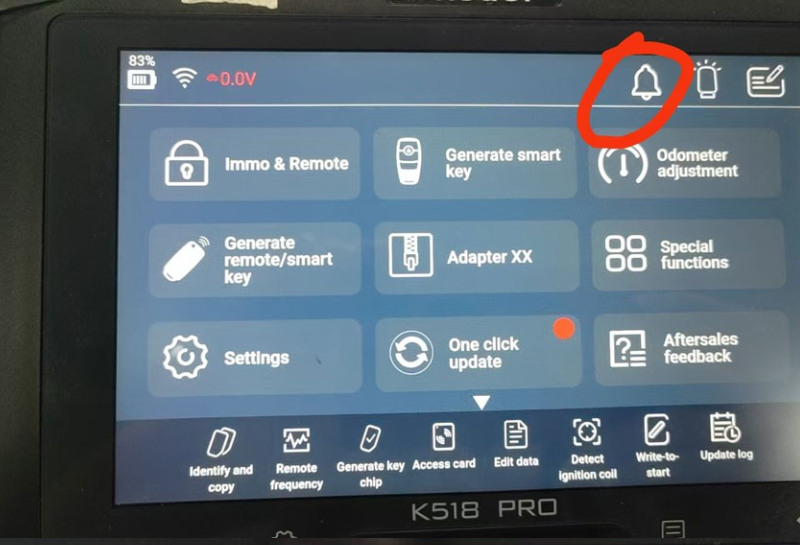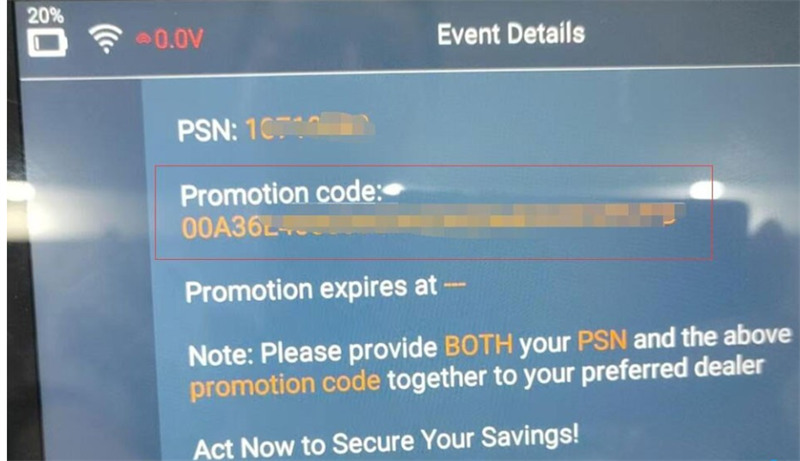
To get a Lonsdor K518 software subscription promotion code, simply power on your Lonsdor K518 PRO or other K518 key programmer, tap the bell icon on the top right of the screen, and the code will display. You will need to provide both this code and your device’s PSN (serial number) to Lonsdor or your authorized dealer to get 20% off your renewal.
Steps to Retrieve and Apply Your Promo Code
1. Get the Code: Power on your Lonsdor K518 device and connect to Wi-Fi. Tap the bell icon in the top right-hand corner of the screen to reveal your promotion code.
2. Locate your PSN: You will also need your device’s PSN (Lonsdor serial number). You can find this in the device settings or on the back of the tablet.
3. Purchase the Subscription: Contact an authorized distributor (such as cardiagtool.co.uk) to purchase the update package.
4. Submit for Discount: Provide both the PSN and your generated promotion code to the distributor. If your current annual subscription has not expired, just enter this code alongside your K518 device PSN at checkout to unlock the promotional pricing.