
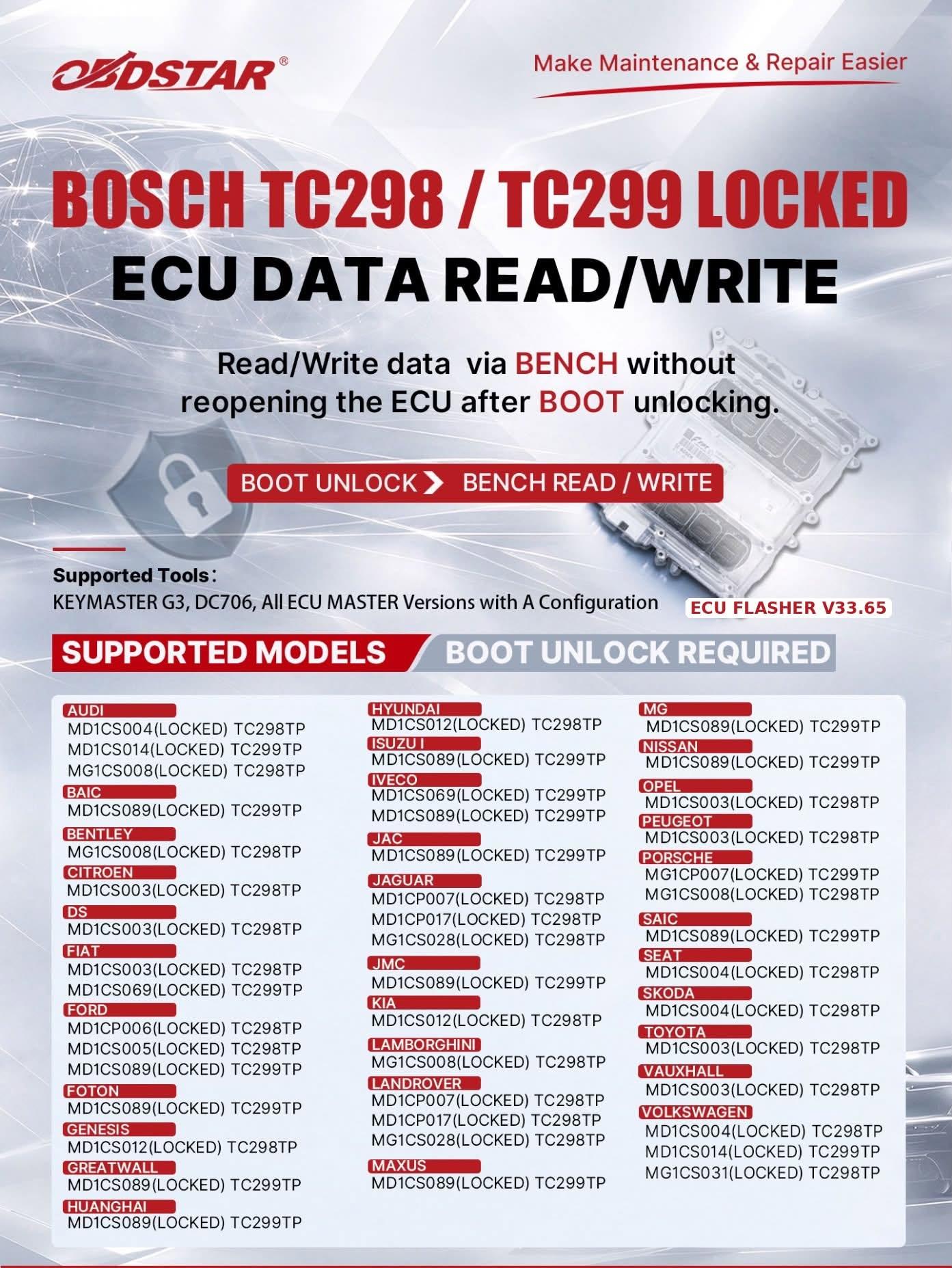
Locked ECUs can make data reading and writing more complicated, particularly when the usual bench connection is not enough to access the required data. For technicians working with Bosch TC298 and TC299 ECUs, OBDSTAR now offers a solution that combines BOOT unlocking with BENCH data read/write.
Why Is BOOT Unlocking Needed?
Some Bosch TC298 / TC299 ECUs have protection that prevents normal data access. In these cases, a BOOT operation is needed to unlock the ECU before data read/write can be performed.
This is an important part of the steps. The new OBDSTAR function does not mean that a locked ECU can be read or written directly through BENCH without preparation. The initial BOOT unlocking step is still required.
After that, you can use BENCH mode for the available data read/write operations without opening the ECU again.
BOOT First, BENCH Next
Stage 1: BOOT Unlocking
Connect the ECU according to the wiring diagram provided by the OBDSTAR software. Follow the instructions to complete the BOOT unlocking procedure.
Stage 2: BENCH Data Read/Write
After the BOOT unlocking process is complete, use the BENCH connection to perform the supported data reading and writing operations.
Which OBDSTAR Tools Support This Function?
Vehicle Coverage
Audi, BAIC, Bentley, Chiron, DS, Fiat, Ford, Foton, Genesis, Great Wall, Huanghai, Hyundai, Iveco, Jaguar, Jeep, Kia, Lamborghini, Land Rover, Maxus, MG, Nissan, Opel, Peugeot, Porsche, SAIC, SEAT, Škoda, Toyota, Vauxhall and Volkswagen.
This is a list of vehicle brands with supported applications, not a guarantee of full coverage for every model, year or ECU. Always confirm the exact ECU type and protocol in the tool before purchasing or beginning a job.
The key point is to understand the sequence, BOOT unlocking is the prerequisite; BENCH is used for the subsequent supported data operations.
If you regularly work with these ECUs, check the latest OBDSTAR software and protocol coverage to see whether your target ECU is supported.